The Missing Interface of the Agent Era

You've built the intelligence. Here's how to actually talk to it.
You've spent time getting your agents connected to your data, your tools, your workflow. The intelligence is there. Every day there's more it could be doing for you.
The promise was clear: agents would free you to operate at a higher level. Less execution. More direction. The exec role, not the keyboard role.
But here's what actually happened.
You're spending more time than ever at the keyboard. Switching contexts to find an input field. Typing commands into a terminal. Opening a laptop to ask a question you thought of on a walk or trying to use a 6" screen to remote in. The agents are doing incredible work. The interface to reach them hasn't kept up.
Transcription tools help speed you up, but you are still fundamentally having to direct into a text input field.
The bottleneck isn't the agent. It's the interface. How do you actually talk to it like you would a real person?
The Messaging App Workaround
The natural instinct is to wire your agent into a messaging app. Telegram, WhatsApp, Slack — familiar interfaces, work from anywhere, easy to connect a webhook. Makes sense.
This solves the problem of accessibility when you're away, but it's still funneling you into an even harder-to-type interface.
Voice and talking is the interface of executive communication, but voice in consumer messaging apps is bolted on as an afterthought. Sure, you can hack a voice note. Wire up an STT API. Add a TTS integration. Get it routed to the right place. It works, technically. But it feels clunky because voice was never the point. It was an add-on to a text-first system.
Many AI agents attempt to solve this with a real-time voice interface. This introduces two new problems: VAD (Voice Activity Detection) and network dependency. The system has to guess when you're done speaking. It can't tell when you're done thinking versus done talking. You get cut off mid-thought. And then the eager agent starts operating on half-baked information. The interaction fights you instead of working with you. And if you are on-the-go, spotty networks can have you waiting and your ideas get lost while waiting or worse after you've said them.
There's a better way.
The Exec Role You Were Promised
Think about how you'd work with a great chief of staff. You don't schedule time to talk to them. You don't open a terminal and type commands. You catch them between meetings. You call out a thought when it hits you. You braindump on a walk and trust them to execute.
That's the relationship the agent era was supposed to unlock. Your agents as your chief of staff. You as the executive, directing, not executing.
Carbon Voice Agent Accounts connected to your agents makes that real. It's a No-Code Voice API for your agents.
What It Actually Looks Like

On a walk when your best ideas strike, just swipe and talk. At your desk when you want to kick off a task, one keystroke and you're talking to your agent. No toggling. No hunting for an input field. No context switching.
Async means you're in control. Speak your full thought when you have it. Tap send, move on, and get pinged when your agent is ready. No waiting on the network. No real-time AI cutting you off mid-thought. Your agent offline or computer asleep? It's all queued for when it wakes up.
Up to 10 agents can have their own hotkey, instant access to the popular ones, anywhere, any network.
Works with any agent that supports webhooks or websockets. Setup guides for OpenClaw, n8n, Hermes, Claude Code, Tasklet, and more added regularly.
For Builders: All the Voice Plumbing Is Solved
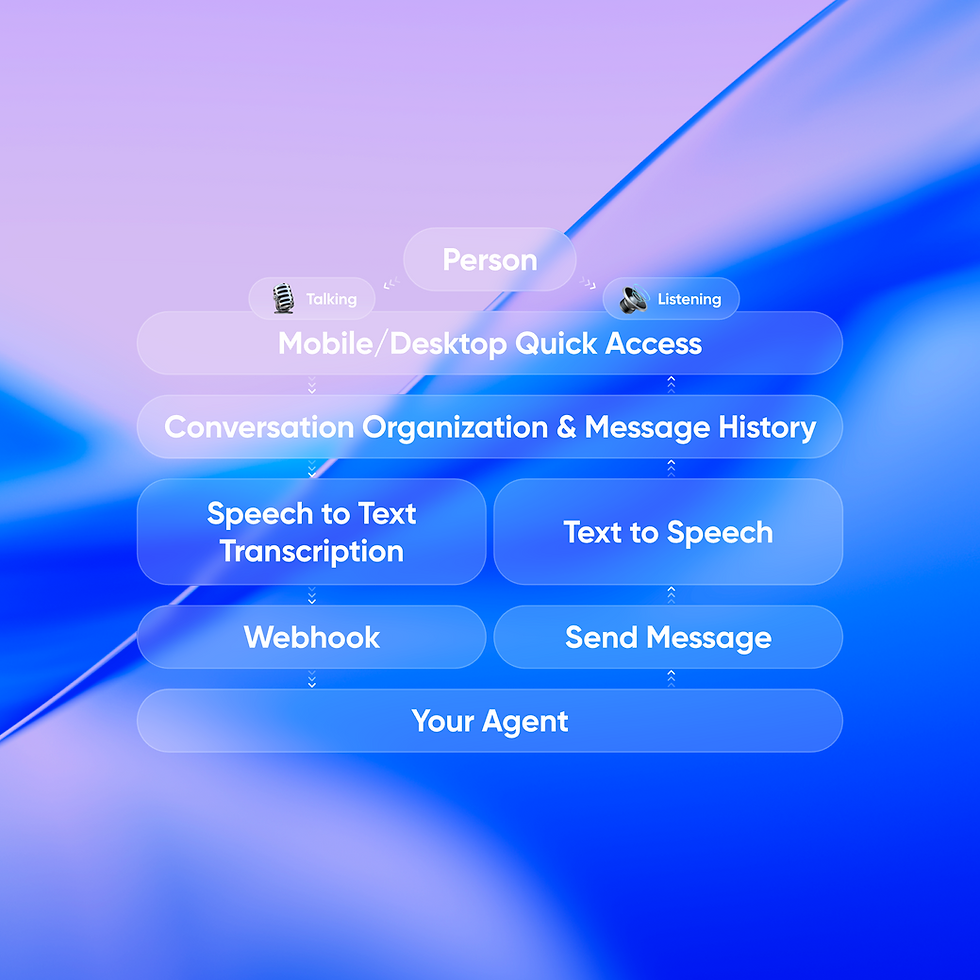
If you're building agents, your users can now effortlessly talk to your agent, so you can stay focused on building out the intelligence.
Here's the whole builder mental model: your agent receives transcribed text. It sends text back. Carbon Voice handles everything else on both ends.
Inbound: user speaks → we capture, transcribe, deliver text to your agent.
Outbound: your agent sends text back → we handle TTS, threading, notifications, delivery.
Point Carbon Voice at your agent with an access token or register a webhook. That's it. STT, TTS, async threading, searchable transcripts, push notifications, low-network resilience, Play All, Listen Later, AI catch-up summaries, conversation access controls. iOS, Android, web, desktop, Apple Watch.
Your agent doesn't need to know anything about voice. It just reads and writes text. The No-Code Voice API handles everything else.
Years of infrastructure and UX. Ready in minutes.
The Bigger Picture
The agent era doesn't need another real-time text chat interface. It needs a voice layer built for humans that is Voice-first, Async by design, with agents as first-class participants alongside your team.
The exec role you were promised is still available. You just need the right interface to claim it.
You just talk and let your agents start doing their work.
Get started free at getcarbon.app/agents
Building an agent you'd like to give a voice? Let's talk - https://cv.chat/demo
- Travis Bogard, CEO Carbon Voice


Comments